Automate the daily round-up you post to Slack
Record yourself doing the round-up once: open the sources, pick the items worth sharing, post them to the channel. Ditto AI reads public pages with a headless browser that needs no setup, connects Slack with a tool server you sign into, and gives you an agent that posts the next one. You can watch this exact task run in the browser demo.
The task
Every morning someone reads a few sources, picks the handful of things the team should see, and posts a short list to a channel. It's ten minutes, it's never hard, and it's exactly the kind of thing that gets skipped on a busy day and then missed.
The two halves need different things
This task has a shape worth understanding, because it's the shape of most cross-app work:
- Reading the sources is public. Anyone can open those pages. No account, no integration.
- Posting to the channel is not. That needs your workspace, which means a real integration and a credential.
Ditto AI treats those differently on purpose. A step is classified from the recording as public or signed-in, and being logged into a site doesn't make reading a public page a signed-in step.
Public steps go to one headless browser with a fresh, in-memory profile. Nothing is configured, and verification just opens the page you visited and checks it comes back readable.
The post needs a Slack tool server. Ditto looks for one in the official MCP registry and on npm, ranks the candidates (the vendor's own first), starts the best one, and makes one read-only call, such as listing the channels you can see. It never posts a test message to prove that posting works.
Step by step
- Record the round-up once. Open the sources, read them, switch to Slack, write the message, post it. Say out loud which parts change: "the channel is always the same; the items change every day".
- Read the steps Ditto found. Each one shows the app, what it was detected by, and what you clicked.
- Connect Slack. Ditto reads the chosen server's README to find out exactly which credential it needs, and asks you for that. Once a real read-only call returns data, the tool shows as configured.
- Review and run. Type what's different today, or leave it empty to repeat what you recorded.
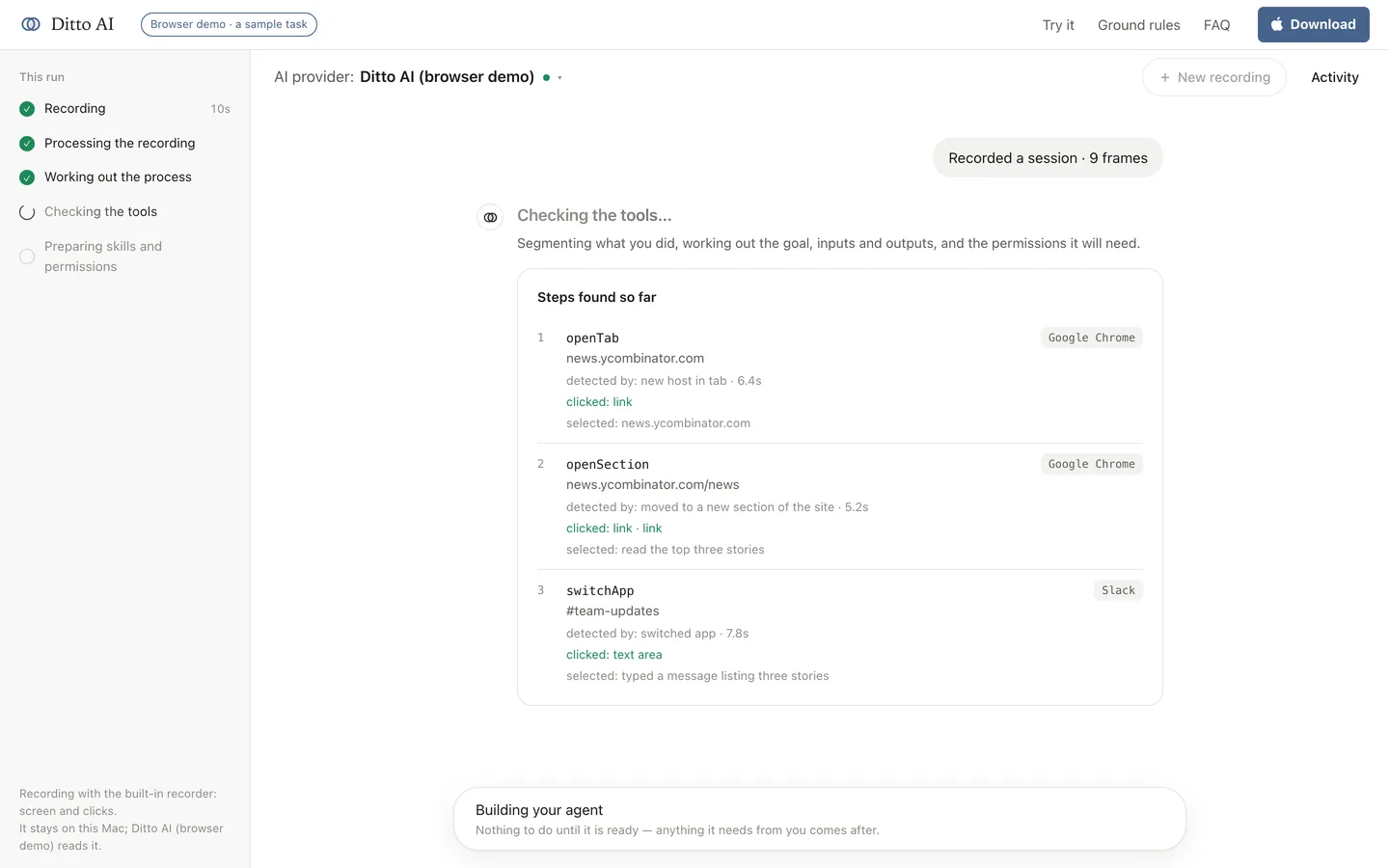
See it before you install anything
The demo on the home page runs a version of this task in your browser, with a sample task. Nothing is recorded there and no model is called. It's the fastest way to see what a recording turns into.
What it's allowed to do
| Tool | What the recording did | Access it gets |
|---|---|---|
| The source pages | Read them | read (a headless browser) |
| Slack | Posted a message to one channel | write |
The headless browser is always read-only. Slack gets write access because the recording posted, and that's the one write in the whole agent. If Ditto couldn't classify a tool, it would count it as a write rather than assume otherwise.
For the first runs, keep Ask before it creates, sends or changes anything on: the message is prepared as a draft and shown to you before it goes to the channel. With it off, the agent posts to the channel you recorded, and still stops to ask before posting anywhere new.
Honest limits
- Slack's own hosted server needs a sign-in Ditto can't do yet, so it uses the most-used local Slack server instead. The review says so, and names the server it chose.
- A site that blocks the headless browser shows as a failed check before the first run, not as a surprise during one.
- Picking what's worth sharing is judgment. The agent follows the pattern you recorded. If a day's selection really matters, review the draft.
Adapting it
The same pattern fits any "read some sources, post a summary somewhere" job: a weekly digest to a channel, a status note to a project page, a summary email. Record the one you actually do.
Install Ditto AI to record your own, or try the browser demo first.